October 2009 Archives

#017 Sensor Mounting - 1

Sensors are used to control positions and speed of the actuators used in automation designs. In order to achieve proper functional sensitivity from the sensors, placement of the sensors become important.

Sensor types and mounting methods

(1) Sensor types and definition

Definition of a sensor is as follows.

image

Sensors must be placed properly to detect the physical occurrences (presence of objects, speed, pressure variations, etc.) accurately.

image

image

(2) Position detection sensor types and points on location adjustments.

 Position detection sensors are following types.

image

(3) Position detection sensor mounting
For a single axis linear motion system, an end-of-travel limit switch at each stroke end, and a home position limit switch will be used.
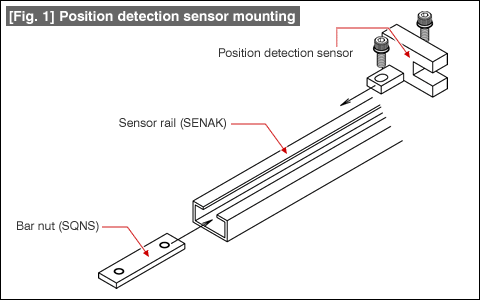
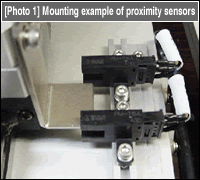
Use a [1] Sensor rail and [2] Bar nuts to mount the sensors. See [Fig. 1] and [Photo 1] for usage examples. image

image

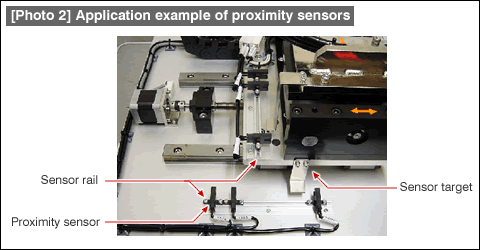
[Photo 2] shows an arrangement of position sensors/sensor rails/bar nuts for a 2-axis XY table.

image

#016 Application Examples on Connecting with Linear Motion Components

Introduced here are some methods for connecting air cylinder piston rods to moving objects.

Methods for connecting air cylinder piston rods.

(1) Principles of connecting linear motion mechanisms.

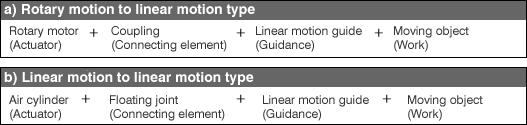
Following two types are the most popular representatives of linear motion drive train.

image

The rotary to linear type has a coupling that absorbs wobbles, and transmits the needed rotary to linear motion.
For the linear to linear connection scheme, a Floating Joint is used to connect the air cylinder and the moving object. Play in the floating joint provides the same function of the couplings.
If the air cylinder and the moving body are connected without the use of a floating joint, damages may result on the air cylinder's piston seals due to excessive direct forces applied upon the seals.

(2) Application examples of Floating Joints

[Fig. 1] shows a standard methods of a floating joint connection.

[Fig. 1]

[Fig.2] illustrates the assembly of the floating joint. The floating joint is composed of the holder, nut, ring, and bolt. There is some margin between the space inside the holder and the nut.

[Fig. 2]

[Fig. 3] & [Photo 1] are application examples of Flange Mount Type Floating Joints.

[Fig. 3] & [Photo 1]

#015 Usage Examples of Hinge Pins

Introduced here are some examples of connecting two machine elements together. We have discussed some connection methods for rotating shafts. Here, the discussions will cover some cases on connecting two elements where one is stationary and the other will be moveable.

(1) Connecting Hinge Pins

(1) What is a Hinge?

A hinge is a mechanical element composed of two parts where one is fixed stationary and the other is able to pivot freely. A hinge can be configured using Hinge Pins.

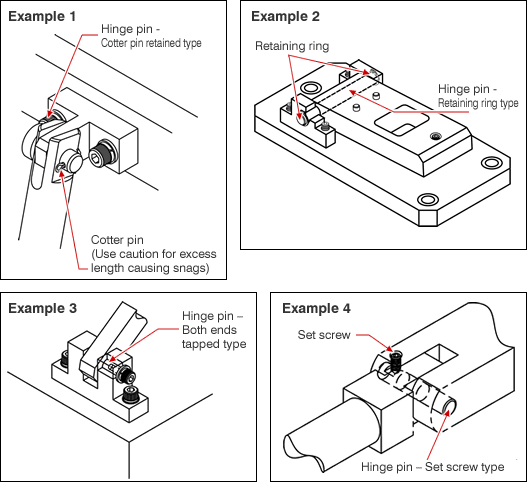
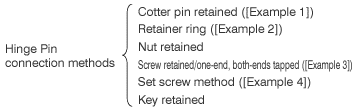
(2) Connecting methods using Hinge Pins.

There are following types.
image

image

The Hinge Pins are manufactured with "g6" O.D. tolerance. Mating bores should be made with H7 tolerance to achieve "Slip Fit" connections.

(3) Hints on selecting the connection methods

Evaluate the following check list against the applicable mechanism characteristics to select a proper connection method.

image

a) The hinge pin and axial force relationship

Hinge pin retaining strength against the axial force would be as follows.
(Low strength) Cotter pin < Retaining ring < Retaining screw < Nut retained < Female thread < Key retained (High strength)

b)Hinge pin replacement frequency

Cotter pins are one-time use only, cannot be reused.
Key retained type is somewhat cumbersome to work on.
Other methods render for easy replacement.

c) An end of the hinge pin can be grasped or not.

If an end of the hinge pin cannot be grasped due to design constraints or there is a width constraints, the retaining screws or the key retained types can be employed.

(4) Cautionary points on connecting.
When using cotter pins, bend the pin at a proper length to avoid snagging on the rotation section.

Connection methods for linear motion components, next.

#014 Usage examples of Locating pins / Guide : Locating of Various Types of Work

Locating techniques are shown here with silicon wafers (thin round disc) and printed circuit boards (thin rectangular boards) as examples.

(1) Hints on how to determine the locating techniques

By properly selecting the following criteria, locating techniques for a variety of work can be determined.

a)Select locating pin material and shapes based on understanding the work's specific characteristics.
example: hard, soft, easily scratched, easily cracked/broken, deformed/warped, electro-statically damageable, cannot be tested ...
b)Determine if the work itself possesses any reference feature.
example: has pilot holes for locating, and the holes are indexable from the reference feature
c)Select locating pins/guides that match the methods for in and out-feed of work.

(2) Examples of locating various work pieces

Example - 1: Locating silicon wafers

[Fig.1] Locating silicon wafers

Characteristics of the work piece
Thin disc shape with a partial notch.
Material is hard, and the disc's side could cause wears on the location pins.
Used in clean environment and cannot tolerate rust.
Tips is spherical shaped.
Tip is spherical shaped.
Work is located on it's sides.

In-feed and out-feed method
Work is automatically located so only the top side needs to be open for access.

Example - 2: Locating a PC board with pilot holes

[Fig. 2] Locating a PC board with pilot holes

Characteristics of the work piece
The work piece contains glass fiber and the locating pins will gradually wear.
Select locating pins that match the pilot holes.
Use a design that makes locating pin replacement possible.
Provide a slot on the fixture (work efficiency)

Locating reference
Locating holes provided on the PC board.

in-feed and out-feed methods
Give considerations to improved work efficiency since the operation will be manually performed.

Example - 3: Locating a PC board without pilot holes

[Fig. 3] Locating a PC board without pilot holes

Characteristics of the work piece
ame as Example - 2
Use plastic to avoid short circuits and electrostatic damages.
Select "Work Guides" as the locating method.
Select plastic for "Work Guides" material.
(Others omitted)

Locating reference
Select "Work Guides" instead of pins since the PC board is located on external features.

In-feed and out-feed methods
(Omitted)

月別 Archives

Pages

Powered by Movable Type 6.0.3

About this Archive

This page is an archive of entries from October 2009 listed from newest to oldest.

September 2009 is the previous archive.

November 2009 is the next archive.

Find recent content on the main index or look in the archives to find all content.