October 2015 Archives

#215 Design Image Training - 31: Designing Reliable Automation Device

| No Comments | No TrackBacks

An automation device is comprised of the mechanism unit and drive unit with many components assembled along with other units including sensing/control units. This section explains the reliable design of an automation device that has a complex structure as described above.

  • "Reliability" is a technical term defined in the JIS glossary. It is defined as "a characteristic of a system, device, or component thereof expressed as a probability that it will perform its required function under the given conditions within the specified operating periods".
  • "Reliability" is expressed by a multiplication formula (series model) of the reliability of all the assembly components comprising the automation device.
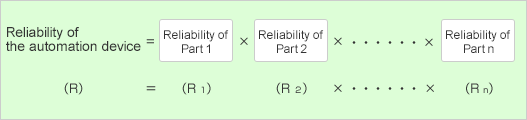
    Reliability of the automation device

  • Since the reliability decreases by the number of components multiplied, it is more effective to decrease the number of components than to increase the reliability of individual component.

    Examples:
    * The reliability of the automation device with 10 components (90% reliability) assembled is R = 0.910 = 0.35, which is extremely low.
    * Improving the reliability of 10 components to 93%: R = 0.9310 = 0.48
    * Decreasing the number of components to eight by eliminating two components: R = 0.98 = 0.43
    * Even if the reliability of each component is 99.9%, the overall reliability will be calculated as R = 0.9991000 = 0.368 for 1,000 pieces.
    * For the system design requiring 100% reliability, such as a space satellite, the parallel model will be adopted instead of the series model for its redundancy.

  • The table below shows the major failure factors for the assembly mechanism unit and sensing/control units (◎ indicates an extremely high ratio)

    Figure

  • As you can see from the above table, minimizing the number of components, especially the sensor components, is the important factor in designing a highly-reliable automation device.
  • It is also important to adopt a design that is highly reliable and easy to maintain ("good accessibility" in other words) during the operating period.
As the structure is becoming closer to reality while making progress with the assembly drawing design, the designer may encounter an issue that the actual structure may not be the same as the conceptual design.
This section introduces some of the solutions in such cases.

  • The following solutions are available if the designer encounters an issue while making progress with the design work. If it happens, the designer himself/herself must surely resolve the issue.
    Issue Solutions Specific examples of the solution
    A structural problem occurs in the initial conceptual drawing.
    1. Mark the area of concern and add an alternative idea in the design drawing.
    2. If it is not possible to come up with an alternative idea, try finding a solution while working on another drawing to buy some time.
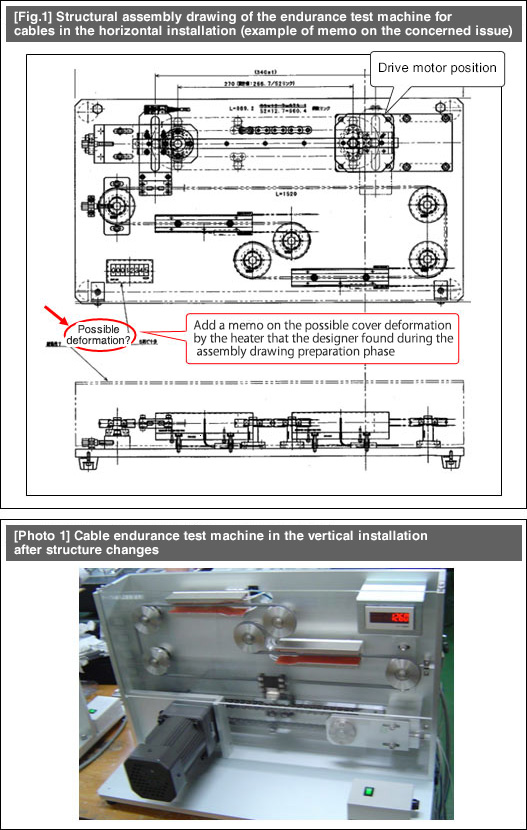
    • For [Fig.1]:
      Illustrate the risk of thermal deformation for the cover and write a memo that this issue must be resolved.
    • If the design includes any component(s) to be concerned about, design an alternative component and procure the processed goods of the alternative component(s) in the assembly process.
  • [Fig. 1] is the assembly drawing of an endurance test machine for cables.
  • A heater to increase the cable temperature is embedded in this test machine. The assembly drawing includes a description of this expected issue that the cover may be deformed by the heat generated from the heater.
  • As you can see from [Photo 1], the actual test machine completed is different from the assembly drawing shown at [Fig.1].
  • The assembly parts layout has been modified drastically in order to resolve the possible issue on the cover deformation. In addition, the designer has reduced the installation area of the test machine and moved the center of gravity to a lower position in order to improve the installation stability.
  • The test machine was going to be installed horizontally during the [Fig.1] design process. Then, the completed structure was modified by installing the flat plate in the vertical direction. By doing so, you can achieve the followings: 1) Release the heat from the heater upward into the air; 2) Place the installation plate and the motor on the bottom to move the center of gravity to a lower position (see [Photo 1]).

    Figure

#213 Design Image Training - 29: Dimensioning in Assembly Drawing

| No Comments | No TrackBacks

This section explains dimensioning in assembly drawings.

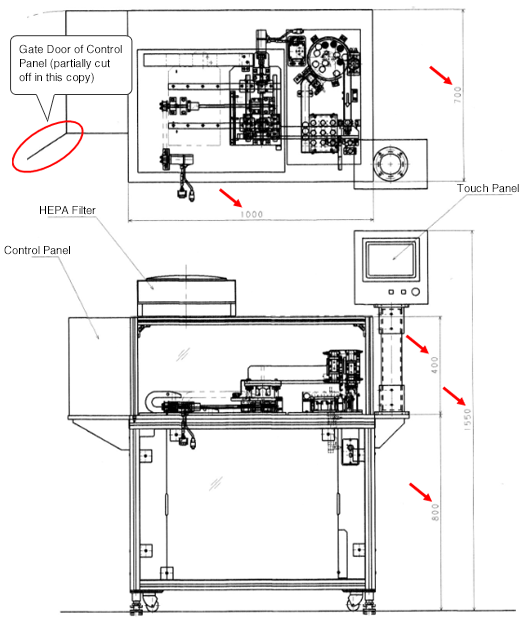
  • [Fig.1] is the front view and plan view included in the entire assembly drawing of the Bingo Machine.In these views, there are five areas with their dimensions specified.
  • The purpose of dimensioning in the entire assembly drawing is to provide typical dimensions of the device as well as to understand its outline dimensions used for layout information or inspection at delivery.
  • Therefore, if the device includes a gate door (example: red circle part in [Fig.1]), a good drawing should include the full-width dimensions when the door is open. This way, the drawing is also useful for securing the maintenance space during the layout process.

    Figure

Dimensioning in subunit assembly drawing
  • A good assembly drawing of a subunit should include as many assembled dimensions as possible.
  • Using the values of the dimensions specified in the subunit assembly drawing is extremely efficient in reviewing the part dimensions after creating the part drawing from the subunit assembly drawing.
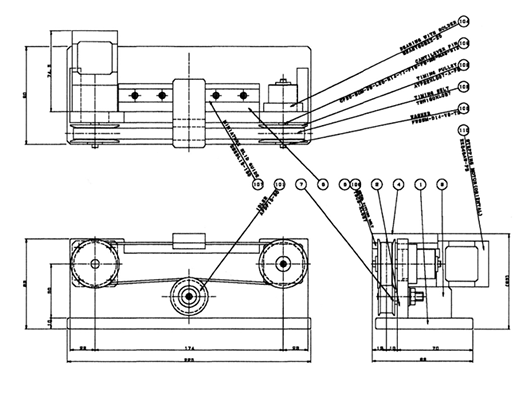
  • [Fig.2] is the assembly drawing of the Belt Driven Shuttle Unit introduced as a usage example of the standard components listed in the MISUMI FA Mechanical Standard Components Catalog.This drawing includes almost all of its external dimensions and assembled dimensions.

    Figure

月別 Archives

Pages

Powered by Movable Type 6.0.3

About this Archive

This page is an archive of entries from October 2015 listed from newest to oldest.

September 2015 is the previous archive.

November 2015 is the next archive.

Find recent content on the main index or look in the archives to find all content.